Author = Aditya Khedekar (AI-Engineer @Urbanmatch)
References used throughout the blog
ex_query = I am looking for someone from NYC,loves traveling and is above 25 years old

Dense Embedding Model = Qwen/Qwen3-Embedding-4B
Sparse Embedding Model = naver/splade-cocondenser-ensembledistil
Deep Search (AI-matchmaker) is an advanced hybrid search feature that empowers users to search the complete user database of Urban Match ✨ for their specific criteria in natural language!
IT filters out the best profiles based on the criteria mentioned in the query
There are 4 main components
Deep Search Algorithm
Search algorithms (Hybrid Search, Cosine-Search)
Infrastructure
Inference and GPU stack
Performance Optimization tricks 🫡
Deep Search Algorithm
Algorithm Flow :
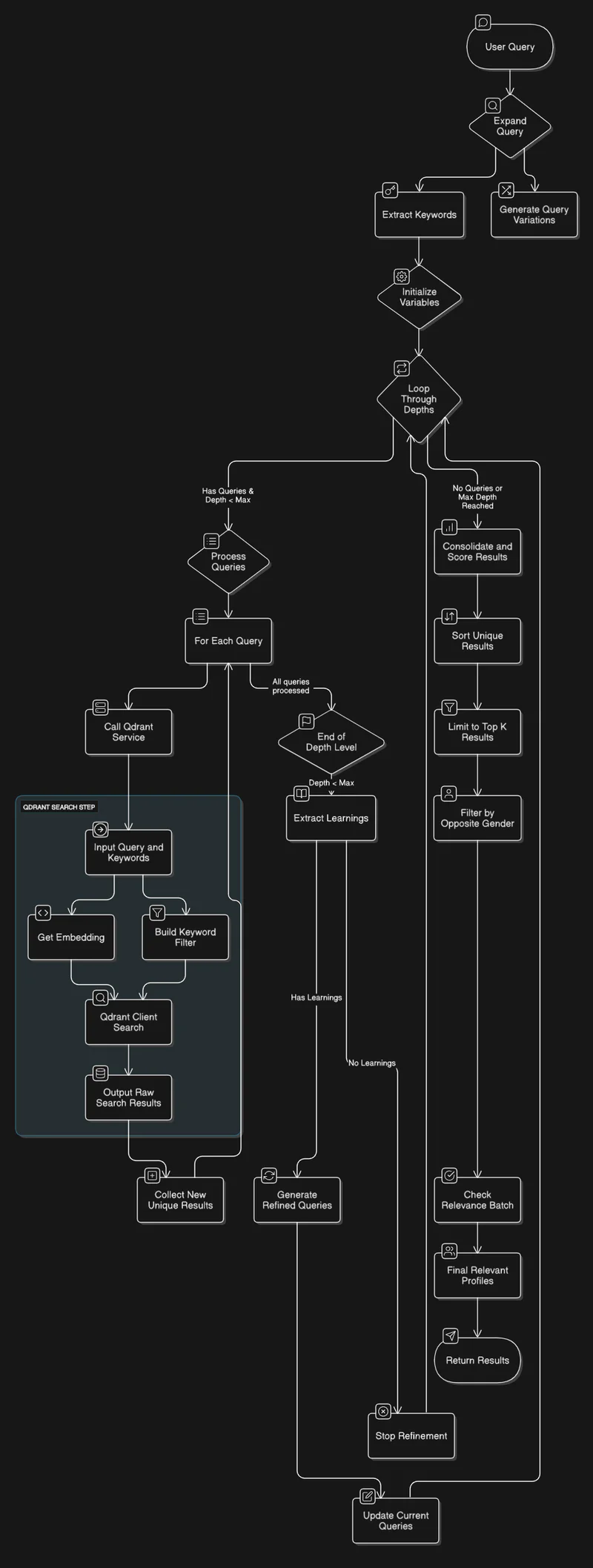
Search Algorithm Consist of 2 Main components Depth and Breadth:
Depth length of the loop (default = 2)
Breadth length of the search calls at each depth (default = 3)
When a user makes a search query:
We expand it into multiple variations this helps us in exploring different search spaces in the collection
{"variations": ["I am looking for someone from NYC, loves traveling to exotic destinations, enjoys cultural experiences, and is above 25 years old.", "I am looking for someone from NYC or nearby, enjoys traveling, exploring new cuisines, and is above 20 years old.", "I am looking for someone from NYC, loves traveling, is adventurous, open-minded, and is above 25 years old.", "I am looking for someone from NYC, loves traveling, enjoys hiking, photography, and exploring nature, and is above 25 years old.", "I am looking for someone from NYC, loves traveling, works in the travel or hospitality industry, or has a degree in tourism, and is above 25 years old."], "filter_terms": ["NYC", "traveling", "above 25 years old"]}At each depth we make 3 simultaneous Hybrid search queries this optimizes the total response time
We collect all the Unique profiles in a list with max limit 40 profiles per query
Learnings and Refinement
After we collect unique profiles from the first parallel search, we than analyze top 5 profiles for
most prominent or common characteristics, interests, locations, or themes among them
Focused on extracting concise, key takeaways that could be used to refine the next search iteration. Avoid generic terms
And we generate next 3 search query based on the learnings derived from depth 1
["profiles of individuals from NYC who are above 25, love traveling, hold advanced degrees, and have minimal drinking habits","profiles of ambitious and value-driven professionals from NYC who are non-smokers, above 25, and passionate about exploring new places"]And it further continues to search and get unique profiles and create next 3 search queries.
Post-Processing
After we collect all the unique profiles from 3 parallel hybrid search
We Filter out the profiles based on gender (male profile ⇒ female profile )
Perform a relevance check on the all the gender-filtered profiles
IF the profile is further filtered we create matched and unmatched keywords
And finally send the result as a response.

Search Algorithms
Cosine Similarity Search (Dense)
Hybrid Search (Dense + Sparse)
Cosine Similarity Search and your experiments:
We experimented with cosine search, different embedding models and collection configurations like m = 32 parameter, which represents number of edges per node
ef_construct=200parameter is the number of neighbors to consider during the index buildingThis setup increases the search precision in
HNSW (Highly Navigable Small World)the indexing algorithm.But we found out that Dense Search was not good at handling complex queries.

Flaws In Dense Representation
Dense Representation Creates vectors for the complete query, overlooking the most important parts of a query and that is keywords (e.g., NYC, travel, 25 years).
And Cosine similarity The function tries to collect vector points that are similar to this query’s vectors and overlooking keywords
Mathematical formula:

Hybrid Search

Sparse/Lexical Weights?
The “sparse / lexical_weights” part is basically a weighted bag-of-words: for every token the model thinks is important, it outputs an integer token-id together with a weight that says “how much should this exact word matter?”
lexical_weights → {token_id: weight}Weight ≈ how strongly that token contributes to the meaning of the sentence (the model learns this during training).
Strengths and Weaknesses of Dense Embeddings
Dense embeddings shine at capturing high-level meaning (“capital of France ≈ Paris”), but they sometimes smooth out or outright lose low-frequency or domain-specific keywords:
“NYC�� might be embedded close to “Boston”, “Chicago”…
Numeric facts (“25 yrs,” “6 ft”) are notoriously badly encoded.
Qdrant runs two independent searchesHNSW on the dense vectors → semantic recall
Inverted-index lookup on the sparse vectors → exact keyword hits (weights act like tf-idf)
RRF (Reciprocal Rank Fusion)
RRF then merges the two result sets so that a candidate that is good in either channel floats to the top.

Infrastructure
QDRANT as vector database
Modal Labs to Host Embedding models
Redis For streaming the events and Caching
LangSmith For monitoring, debugging and evals
High-level service design

Why stream the events to client?
To keep the network open as there is a
hard limit of <60 secThis Unable user to continue to use the applications other feature like
discover page,use some other application or even close the applicationwithout disruption of the Deep Search callThis Event Service is also authenticated, and only the stream creator can access it

Why Scalar Quantize the Collection?
Since We are making
9 search callsan optimization on total response time, scaler quantization offered the collection good balance betweenaccuracy, speed, and compressionQdrant performs
float32 -> uint8conversion for each vector component
Inference-Infrastructure
VLLM (State-of-the-art serving throughput!)
Cold‑start overhead
During our experimentation we found out that vLLM takes around
~7 minsfor the CUDA graph compilation step.As we are running the models in a serverless environment on Modal Labs, which takes around
20 secto start a containerThis Cannot be deployed to production
Aggressive VRAM reservation
-gpu-memory-utilization=0.9reserves 90 % of GPU RAM upfront.On a 24 GB card, that means ~21.6 GB is held for weights + KV cache before any inference.
Run‑time behavior
It immediately reserves ~21.6 GB (0.9 * 24 GB) even before inference.
When you send inputs, it tries to put activations and KV cache inside that reserved space.
If you exceed the allowed cache size, it preempts (i.e., re-runs sequences or drops them).
This doesn't always crash, but it slows things down and sometimes fails if memory pressure is high
PagedAttention
PagedAttention splits the KV cache into page-like blocks, enabling near-optimal memory use (only <4% waste)
vLLM may use slightly less memory headroom for KV (thanks to paging)
TEI (Text-Embedding-Inference)
Fast model loading
Uses Safetensors with memory‑mapping for near‑instant weight load.
Employs FlashAttention and optimized CUDA kernels (e.g., cuBLASLt) to shrink working memory.
Run‑time behavior
TEI might need all contiguous KV storage (though FlashAttention helps)
TEI must load only the model weights and activations. A small example: loading a 0.3 B embedding model used about 1.5 GB GPU RAM
(implying ~5 GB per 1 B of parameters)
Qwen3-Embedding-4B in FP16 might occupy on the order of ~ 20-25 GB
Activations for that input might need 6–8 GB more
Total: ~24 GB or more → 💥 OOM crash
TEI doesn’t pre-allocate, so it "crosses the line" into OOM during inference. No recovery logic
Production
As this doesn't has the cuda graph compilation step,
~7 minswe can use this engine for production
Rough VRAM Scaling (4 B Model, FP16)
Takeaway:
vLLM quickly saturates GPU memory but preempts gracefully.
TEI grows linearly with batch size and crashes on OOM, without recovery.
GPU Configuration
Dual‑GPU deployment to avoid OOM
L40S = Qwen/Qwen3-Embedding-4B
T4 = naver/splade-cocondenser-ensembledistil
Throughput tuning:
MAX_BATCH_TOKENS = 32768MAX_CONCURRENT_REQUESTS = 1024
Shared cache volume
Create a cache to save and download the model so that when you query the model, it immediately loads the model with safe tensor on GPU and process the tokens
We run the large
Qwen3-Embedding-4Bon an Ada Lovelace GPU (Nvidia L40S) for capacity, and run the smallernaver/splade-cocondenseron a T4 GPU for cost-effectivenessBoth models share a cache volume so that once downloaded, they load very quickly
CUDA Checkpoint (modal labs)
While memory snapshots were great, they had an important limitation for GPU workloads—GPU state could not be included in the snapshot
But Cuda Checkpoint allows us to save CUDA graphs and kernels, allowing us to bypass the overhead cost of response time for
cold startin anserverlessenvironment.

IT restores:
GPU memory
Modal weights
CUDA kernels
We were able to slash our
cold bootuptime byhalffrom around22-24 sec → 12-14 secIT also helps you bypass
CUDA GRAPH CREATIONtime required forvLLM inference engines
Metrics
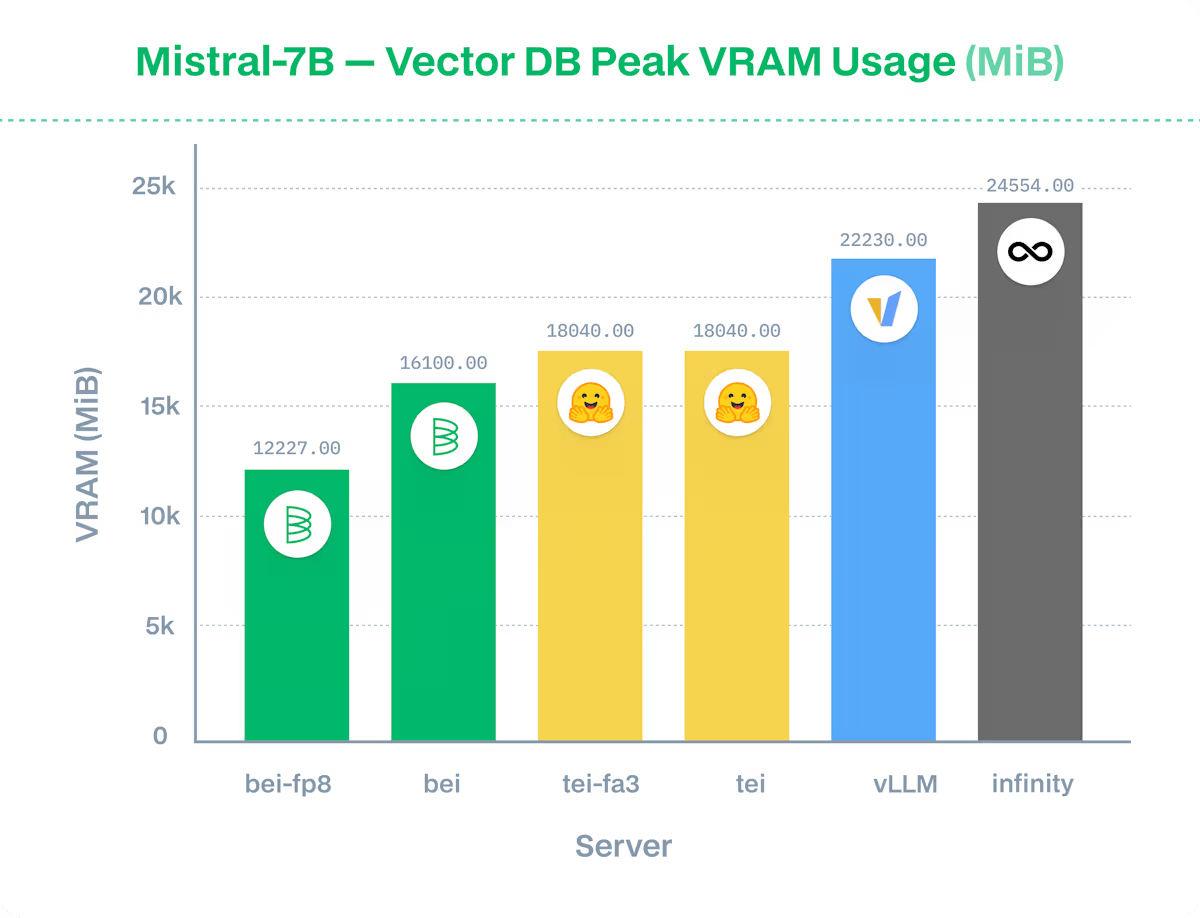
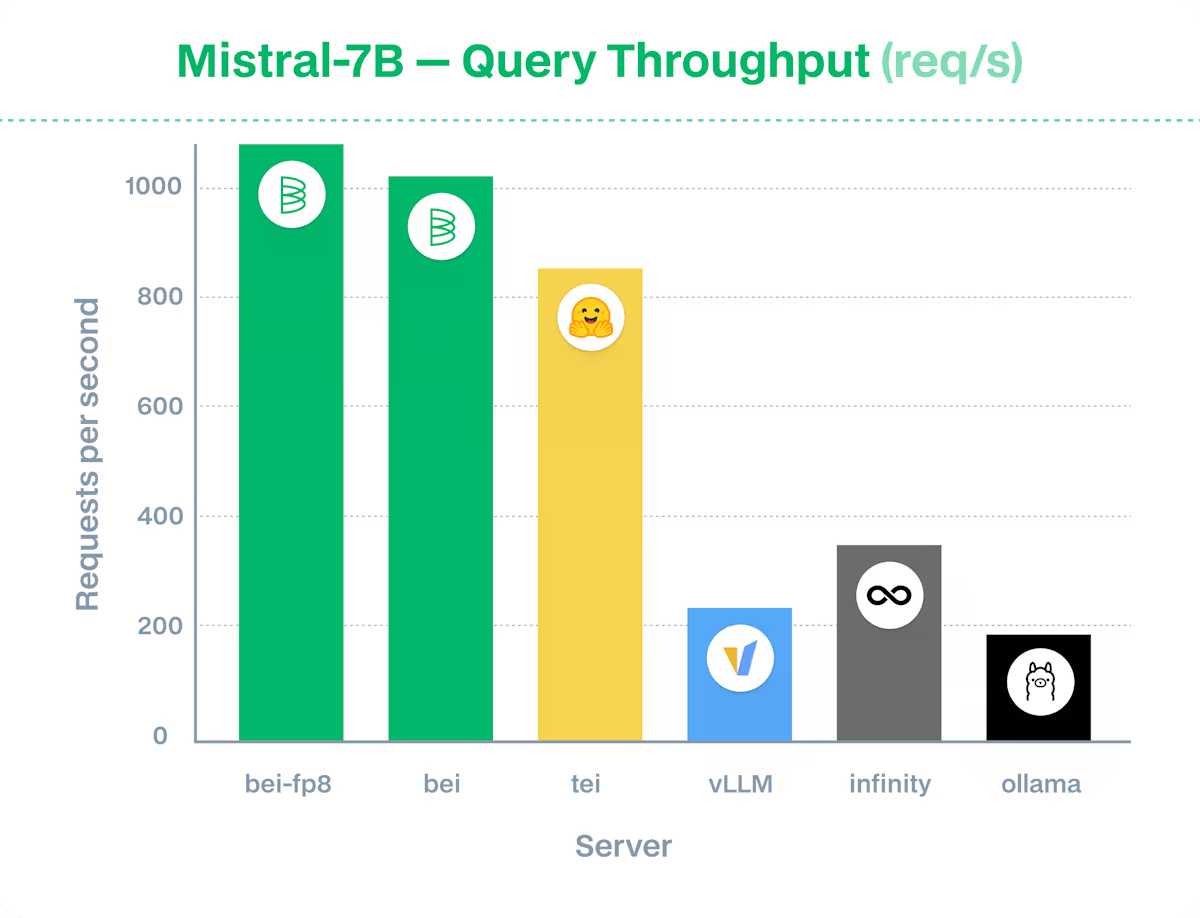
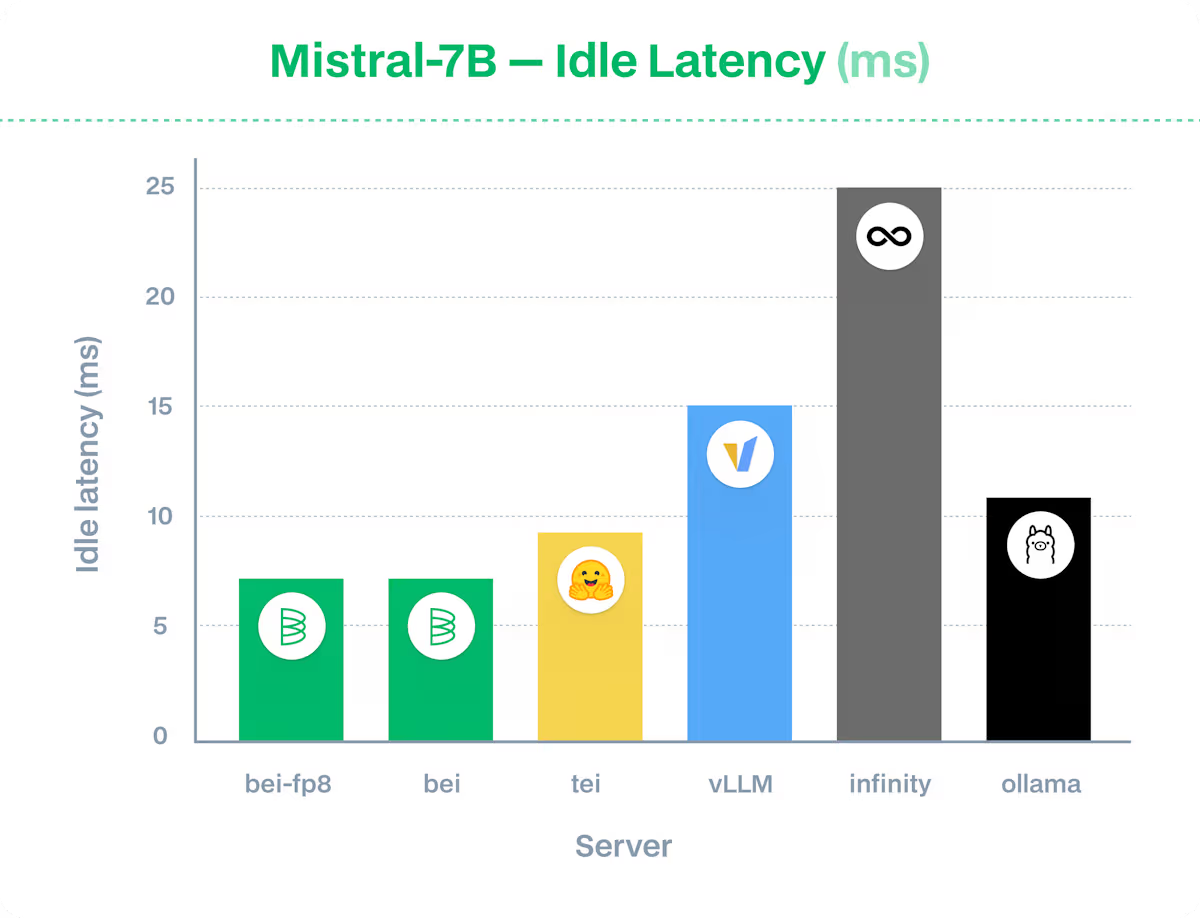
Metrics references (Baseten)
TEI clearly outperforms all the open-source inference engine next to proprietary BEI
CUDA Profiling and optimization
If you choose to use sentence-transformer or vanilla transformer use
*torch.profiler.ProfilerActivity.CUDAfor (DCGM) level traces collection.Input processing (~40%)
aten::to_copy/cudaMemcpyAsync: copying data to GPU (~ 30%)Pure forward pass (~ 30 %)
This shows that input processing and data transfer are significant bottlenecks, suggesting potential optimizations like better batching or reducing GPU memory copies.

Further Improvements
Compositional Search
Colbert Late Interaction (to avoid the needle-in-a-haystack issue with llms during relevance check)
References
Thanks to the researchers at Sarvam-ai internal testing, the current model (Bge-m3) has heavily underperformed (https://www.sarvam.ai/blogs/sarvam-m)